
Adres Doğrulama
Helps stores in Turkey collect address data correctly. Validates and corrects it after the order.
Install on your Shopify store (opens in a new tab)Designed for stores shipping to Turkey with 20+ orders a day.

What it does
Fixes the address
Province, district and neighbourhood matching
Matches the address against the official province, district and neighbourhood data, and repairs abbreviations like “İst.”, “Sisli” or “Kadkoy”, missing Turkish characters and typos. The corrected address is written back to the Shopify order, so the shipping label prints the right one.
Re-parses an address that does not match
An unmatched address is split again into province, district, neighbourhood and street, catching a district typed into the street line. A result below the confidence threshold is not accepted; you choose when this runs.
Fits your checkout fields
Shopify’s Turkish checkout has no separate province field; the province usually lands in the city field and the district in the second address line. You choose which field of the order province, district, address and neighbourhood are read from.
Asks the customer
The customer confirms after ordering
A block appears on the thank-you page and on the order page in the customer account. The customer confirms the address as it is, or corrects it by picking their province, district and neighbourhood from a list.
Email, SMS and WhatsApp verification
If the address still is not resolved, the customer gets a message. You choose the channel, the timing and a ready-made template, up to six messages per order. Once the customer fixes the address, the rest are not sent.
The address page is inside your store
The link in the message goes to an Adres Doğrulama page set up in your store. The form opens inside your theme, so the customer never leaves a store they recognise; you change its heading and text in the theme editor.
You stay in control
Bulk actions from Shopify’s order list
Select orders in Shopify’s own order list and, in one step, run validation on them again or send their customers a verification message.
Order tags and Shopify Flow
Every order gets one tag for its outcome; you name the tags, and your own tags are left alone. Validated, awaiting review and not validated also reach Shopify Flow, so you can hold an unverified order back from fulfilment.
You see what changed
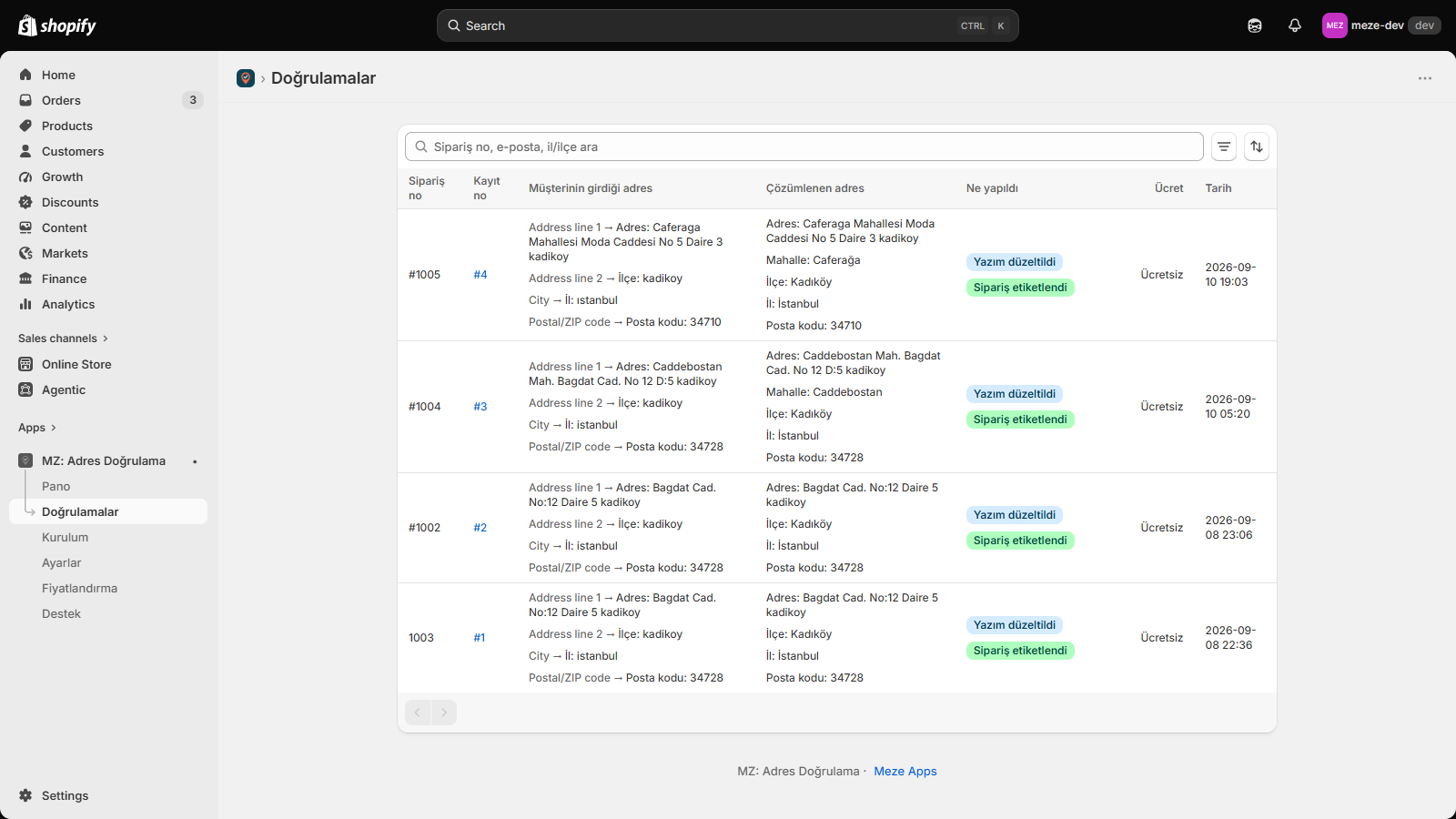
The address as typed sits beside the address as resolved. An order’s detail shows the fields that changed, the tag written and the messages sent or still due; orders that need a manual look are filtered out separately.
Questions about this app
No. Validation runs in the background once the order exists, not during checkout. The thank-you page block appears after payment is done; the customer waits for nothing in the payment flow.
Province, district and neighbourhood matching first; if that fails, the address is re-parsed; then the customer can confirm it on the thank-you page or in their account; if it is still unresolved, the messages you set up go out. The order is fixed: nobody writes to a customer about an address the machine could have resolved.
The order is tagged “Adres kontrol bekliyor” (awaiting review), then “Adres doğrulanamadı” (not validated) once every route is exhausted, and it is listed among the orders that need a manual look on the validations screen. Correct the address on the Shopify order, or build a Shopify Flow that reacts to that state.
All of them, Basic included; Shopify Plus is not required. The thank-you page and customer account blocks are added in the theme editor; installing the app does not switch them on. The app’s Setup screen shows which one is missing.
No. Messages go out from Meze Apps’ account under a sender name registered in Turkey, and each one is billed on your Shopify invoice. Connect your own NetGSM account instead and messages go from there under your own sender name, with no SMS line on your Shopify invoice.
It uses a ready-made template approved by Meta. The message carries the order number and a link to the page where the customer corrects the address. The text is not editable in the app, because Meta allows only approved templates for messages a business starts.
Yes. Shopify’s Turkish checkout has no separate province field; the province usually lands in the city field and the district in the second address line. In Settings, the field mapping lets you choose which field province, district, address and neighbourhood are read from.
No order limit. Matching, typo and diacritic repair and customer self-correction all run without a cap on the free plan. The paid plans add re-parsing the address and messaging the customer by email, SMS or WhatsApp. The plans are set out on the Shopify App Store listing.
Standard includes a monthly quota of AI validations; its size is on the Shopify App Store listing. When the quota is used up the default is to stop: the address still goes through the other steps and nothing extra is charged. Turn on overage in Settings and validation continues, with the excess billed on your Shopify invoice. Pro has no quota.
The fields needed for validation are held in the app’s database and deleted automatically after 180 days. When you uninstall, every record belonging to your store is deleted, and Shopify’s customer data erasure and export requests are honoured. The details are in the app’s privacy policy.
Setup
Installed from your Shopify admin, with no code. It works on any Shopify store shipping to Turkey, on every plan including Basic. The thank-you page and customer account blocks are added in the theme editor.